Listened to Why Kent State Is Always Bad
Why Kent State Is Always Bad By Split Zone Duo: College Football Podcast

On This Day
Why Kent State Is Always Bad By Split Zone Duo: College Football Podcast
Offseason Vibe Checks 2025: The Sun Belt By Split Zone Duo: College Football Podcast

Everyone on the England team is desperate to be picked for the match against Ireland, while the reigning champions are focused on retaining their title.
Watched on Trakt
Italy's new coach is determined to reverse their consistent losing streak. Could they ever stand a chance against the unpredictable Scottish team?
Watched on Trakt

Nobody is immune to the perils of the modern logo redesign. By Accidental Tech Podcast: Specials

The Bank: New names emerging for Canes recruiting class By The CanesInSight Podcast

Eighteen new castaways embark on the adventure of a lifetime when they are left stranded on the breathtaking islands of Fiji. Tribes must be the first to crack the code to earn essential camp supplies. Then, three castaways go on a journey away from their new tribes.
Watched on Trakt

Greg Davies and Alex Horne set their captive band of comics humiliating missions involving cling film, fashion for insects, and face-based shape-shifting
Watched on Trakt

A young girl discovers an idealized parallel universe behind a secret door in her new home, unaware that it contains a sinister secret.
Watched on Trakt
LAX - OAK - SFO - BOS - LAX

Last Week Tonight with John Oliver 8x03 "Episode 212"
Watched on Trakt
Over the past few years, I've invested time and effort into extricating important data and content from external services, and bringing it into systems that I own and control. I've moved on from Facebook and Instagram, established tracking for my movie, tv, and podcast activity, automatically track my location in multiple ways, and much more. But, for years now, one type of data has eluded me: my personal health data.
As of today, that has changed! I'd like to share with you what I've built.
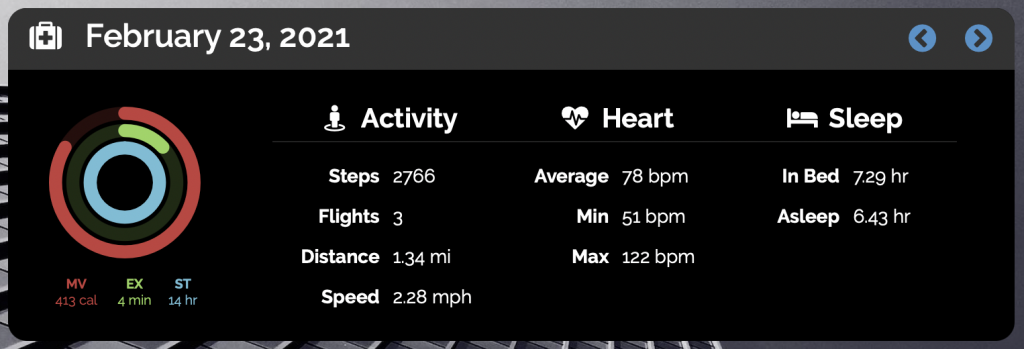
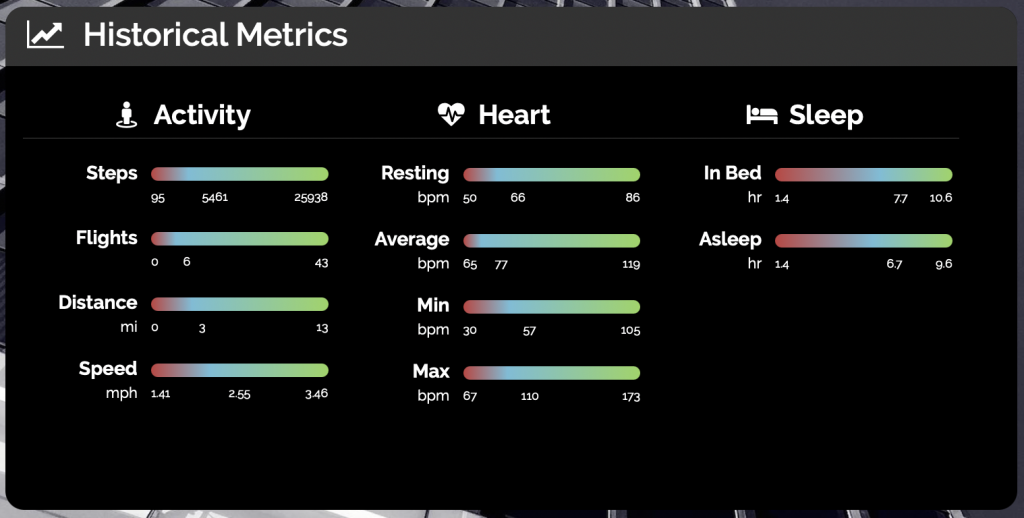
My website now features my personal health metrics in several places. First, there is now a health section which shows both daily health metrics and historical metrics. You can go backward and forward in time and compare my daily metrics to historical min, max, and average values.
For the daily metrics, I use the familiar Apple Activity Rings format, and include supporting metrics across a variety of categories, including activity, heart health, and sleep analysis.
For the historical metrics, I am particularly proud of the visualization. Each metric has a bar representing the minimum, maximum, and average values, and the gradient that is used to fill the bar adjusts to reflect the position of the average value.
In addition, I have augmented my monthly summaries.
Each day is represented by an Activity Ring and can be clicked on to view detailed, in-context metrics for that day.
Overall, I am quite pleased with how this project has turned out. Navigating through health metrics is snappy, the visualizations are attractive and useful, and it fits in neatly with the rest of my site.
Now that we've walked through what these features look like in practice, let's discuss how I gather the data and make it useful.
I've owned an Apple Watch since the Series 2 watch was released, and have worn it fairly consistently ever since. As a result, I've got quite a lot of data amassed on my iPhone in Apple Health. That data is accessible through the Health app, and also via the HealthKit APIs. While I am a pretty strong developer, my skillset doesn't include much in the way of iOS development. I've made a few attempts at building an iOS app that will allow me to extract my HealthKit data automatically, but never made it far before I ran out of steam.
A few weeks ago, I discovered an app called Health Auto Export (which I will refer to as HAE for the rest of this post), which neatly solves the problem. HAE has many great features, but the key feature is "API Export," which allows you to automatically have your HealthKit data sent to an HTTP endpoint in JSON or CSV format, with control over time period and aggregation granularity. With this app in hand, I set about creating an API to store, index, and make that data searchable.
HAE uses a simple, but nested JSON data structure to represent health metrics. Because the data is structured, in plain-text, and will mostly sit at rest, a data lake is a natural target to store the data. Data lakes on Amazon Web Services (AWS) are generally implemented with Amazon S3 for storage, as it is well-suited to the use case, is deeply integrated with AWS' data, analytics, and machine learning (DAML) services.
In order to keep most of the complexity out of my website, I decided to build a microservice which is entirely focused on getting data into the data lake and making it useful. I call this service Health Lake, and the source is available on GitHub.
Let's take a look at the first endpoint of Health Lake, which accepts data from HAE, trasforms it to align with the requirments for AWS's DAML services, and stores it in S3 - HTTP POST /sync.
HAE structures its data in a nested format:
{
    "data": {
        "metrics": [
            {
                "units": "kcal",
                "name": "active_energy",
                "data": [
                    {
                        "date": "2021-01-20 00:00:00 -0800",
                        "qty": 370.75
                    },
                    ...
                ]
            },
            ...
        ],
    }
}
As you can see, the data is nested fairly deeply. In order to simplify my ability to query the data, Health Lake transforms the data to a flatter structure, with each data point being formatted in JSON on a single line. On each sync, I create a single object that contains many data points, one per line, in a format like this:
{"name": "active_energy", "date": "2021-01-20 00:00:00 -0800", "units": "kcal", "qty": 370.75 }
...
Each sync object is stored in my target S3 bucket with the key format:
syncs/<ISO-format date and time of sync>.json
The prefix on the object name is critical, as it enables the indexing and querying of sync data independent from other data in the bucket.
Now that we have data being sent to our data lake and stored in an efficient, standardized format, we can focus on making that data searchable. Very often, I use relational databases like MySQL or PostgreSQL to store data and make it searchable with SQL. AWS provides a few great services which allow you to treat your data lake as a series of database tables that can be queried using SQL.
The first service we'll leverage is AWS Glue, which provides powerful data integration capabilities:
AWS Glue is a serverless data integration service that makes it easy to discover, prepare, and combine data for analytics, machine learning, and application development. AWS Glue provides all of the capabilities needed for data integration so that you can start analyzing your data and putting it to use in minutes instead of months.
Data integration is the process of preparing and combining data for analytics, machine learning, and application development. It involves multiple tasks, such as discovering and extracting data from various sources; enriching, cleaning, normalizing, and combining data; and loading and organizing data in databases, data warehouses, and data lakes.
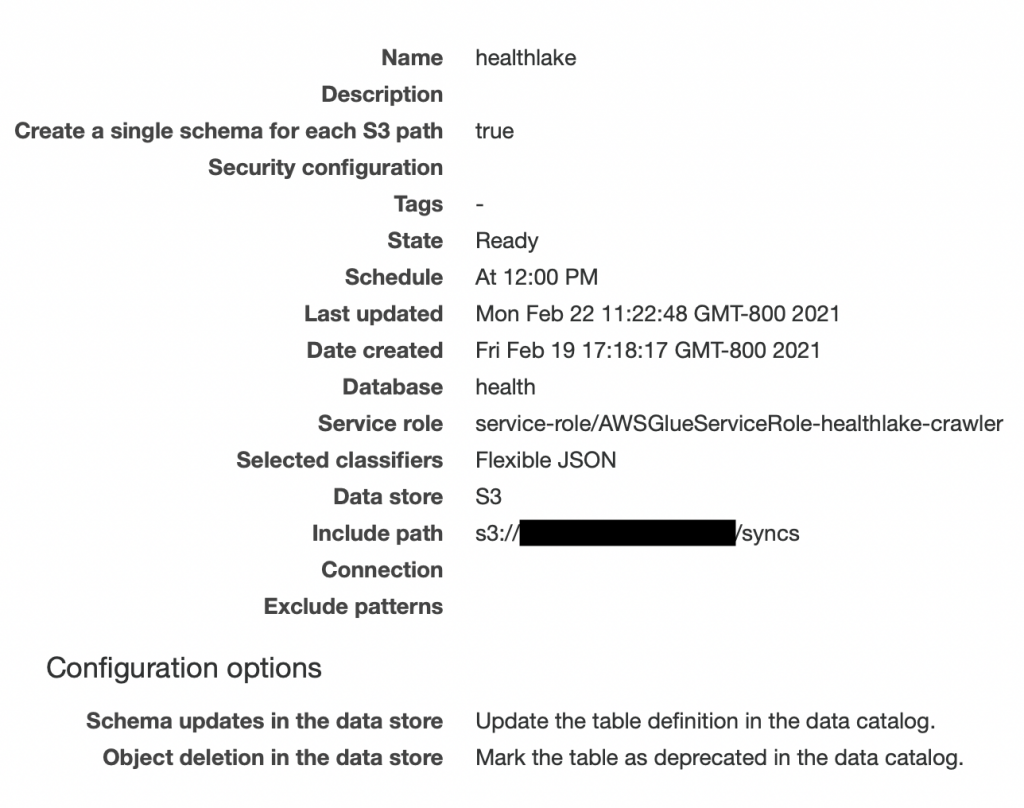
Using AWS Glue, I created a database called "health," and then created a "crawler," which connects to my data store in S3, walks through all of the data, and attempts to infer the schema based upon hints and classifiers. The crawler can be run manually on-demand, or can be scheduled to run on a regular basis to continuously update the schema as new fields are discovered. Here is what the configuration of my crawler looks like in the AWS Glue console:
Upon the first run of the crawler, a new table was created in my health database called syncs, which inferred the following schema:
I wasn't able to get the crawler to match the date format properly, so I ended up creating a "view" which adds a proper column that is a timestamp using the following SQL statement:
CREATE OR REPLACE VIEW
    history
AS SELECT
    date_parse(substr(date, 1, 19), '%Y-%m-%d %H:%i:%s') as datetime,
    *
FROM
    syncs
Now that our data lake has been crawled, and a database, table, and view have been defined in our AWS Glue Data Catalog, we can use Amazon Athena to query our data like using standard SQL. Athena is entirely serverless, so there is no infrastructure to manage, and you pay only for the queries that you run.
For our daily metric view, we need a summary of all metrics gathered on a specific day. To accomplish this, I added an endpoint to our microservice:
HTTP GET /detail/<YYYY-MM-DD>
In response to this request, the client will receive a JSON data structure collecting all data points for that day. Under the hood, the microservice is running the following SQL query:
SELECT * FROM history
WHERE
    datetime >= TIMESTAMP 'YYYY-MM-DD 00:00:00'
AND
    datetime <= TIMESTAMP 'YYYY-MM-DD 23:59:59'
Because I pay for every query that I run on Athena, and to achieve great performance, I store the query results in the proper format for the client in S3 after I run the query. I then implemented some intelligence to decide if, for any given request, I should pull from the cache, or regenerate fresh data. Take a look at the source code for more detail.
To show our monthly summaries, we need to get data for each day of the month. Rather than sending a request and query for every single day of the month, I decided to implement another endpoint to our microservice:
HTTP GET /summary/<YYYY-MM>
In response to this request, the client will receive a JSON data structure collecting all data points for the month, sorted by date. To accomplish this, I run the following SQL query:
SELECT * FROM history
WHERE
    datetime >= TIMESTAMP 'YYYY-MM-01 00:00:00'
AND
    datetime <= TIMESTAMP 'YYYY-MM-31 00:00:00'
The start and end range are actually calculated to ensure I have the proper end date, as not every month has the same number of days. Again, to save costs and improve performance, results are intelligently cached in our S3 bucket.
Generating a global summary of all data points in the data lake was a bit more challenging. To make things more efficient, I created another view in my database with this query. Results are, again, intelligently cached.
With all of this great data available to me, it was time to integrate it with my website, which uses the Known CMS. I have created a Known plugin that provides enhancements that are specific to my website. Using this plugin, I simply send requests to the Health Lake microservice, parse the JSON, and create my visualizations.
Overall, I am quite pleased that I have been able to integrate this data into my website, and more importantly, to free the data from its walled garden and place it under my control and ownership.

Dear Internet, On this weeks show we talk about dealing with your girlfriends terrible singing, having a coitus green house, and potatoes in...

Tina competes with Gene and Louise to write a new school song for Wagstaff. Jimmy Pesto’s new steel awning creates a blinding glare for Bob and Linda.
Watched on Trakt

Comedian Tom Papa takes on body image issues, social media, pets, Staten Island, the "old days" and more in a special from his home state of New Jersey.
Watched on Trakt

Apple possibly adding default-app choice on iOS, shorter HTTPS-certificate lifespans, and Casey’s humongous-gust-of wind. By Accidental Tech Podcast

The Dakota boys are dredging towards a nugget trap they believe holds a jackpot of gold. After a rough season, this could this be the life-changing fortune they desperately need.
Watched on Trakt

Parker's parents visit and offer help; Rick continues to battle frozen ground to reach his goal; shocking news forces Tony to make a drastic decision about his season.
Watched on Trakt

Test cook Dan Souza makes Bridget Sous Vide Seared Steaks. Equipment expert Adam Ried then reviews his top pick for sous vide machines, and test cook Elle Simone makes a show stopping sous vide staple: Soft-Poached Eggs.
Watched on Trakt

Tonight, the three remaining families face a surprise head-to-head challenge for which they have to nominate one family member to cook on their own. There are pastry disasters, fruit controversy and raw egg whites as the cooks tackle a lemon meringue pie. For the second task, the families are reunited to make a two-course meal with lamb and almonds as the star ingredients. The pressure is on as only two families can make it through to Friday's play-offs.
Watched on Trakt
Biz meeting!